
Emergency roll call and accountability: When the alarm sounds, start from a real list
Getting people out of the building is the part you have already practiced. The hard part is the ten minutes afterwards, when somebody at the assembly point has to work out whether the four people nobody can see are still inside or were never in today. InOutBoard will not tell you who walked out of the door. It will tell you who was expected in, what each of them last said they were doing, and who to call about them—which is usually the difference between a head count and a search.

The list at the assembly point is the wrong list
Most organizations account for people from a staff roster printed off at some point in the past. It is a list of everybody employed, which on any given morning is not the same as the list of everybody expected—somebody is on leave, somebody is at a client site, somebody called in sick at seven. So the count never reconciles, and the first several minutes go on people who were safely at home the whole time.
The second problem shows up once a name really is unaccounted for. The roster gives you a name and a department. It does not give you a mobile number, a next of kin, or the note that says this person uses a wheelchair and evacuates via the north stairwell. Those live in a personnel file, inside the building you have just left.
What the status board can tell you
The roster keeps itself current, because people keep it. Everyone updates their own status as they come and go, using status codes, an Administrator words the way your organization actually talks —In, On site, Vacation, Out in the field. Nobody maintains a separate emergency list, which is the reason separate emergency lists are always out of date.
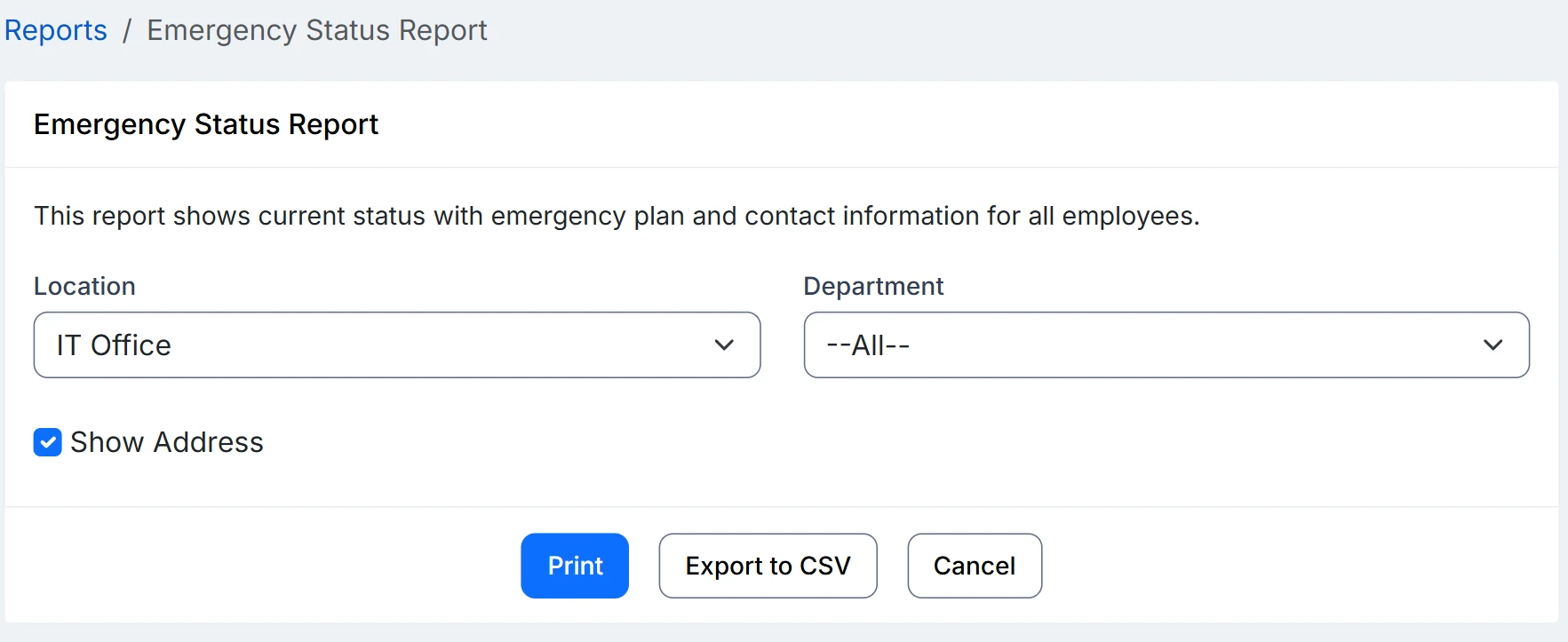
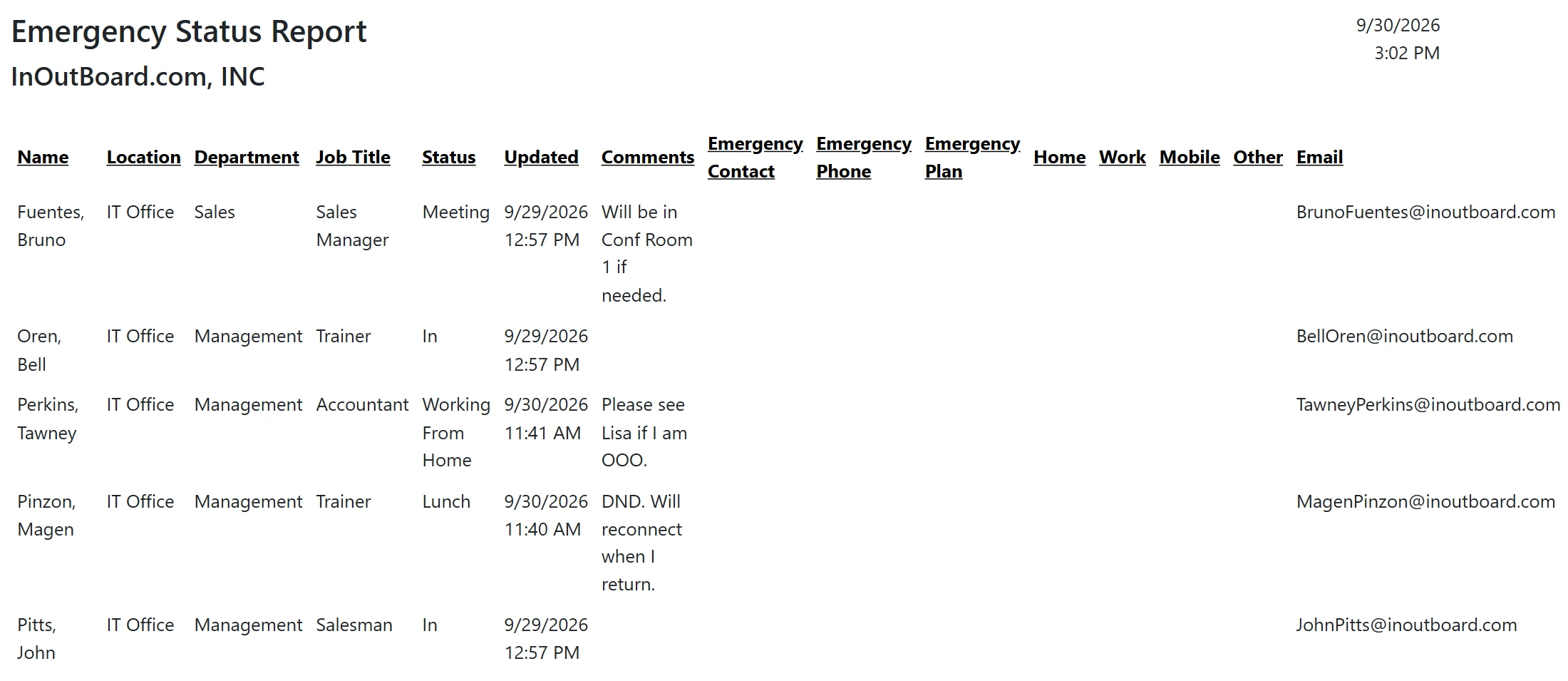
One page on the day. The Emergency Status Report puts every person on a single page with their last recorded status and when they recorded it, their location, department and job title, their emergency contact and phone, their emergency plan, and their home, work, mobile and other numbers and email. Note: Emergency contact and plan information is opt-in. Only individual users can enter their emergency information, on their own user profile. Managers or Administrators can then run and print the report, or export it to CSV.
The preparedness list, before the day. The Emergency Plan Report lists each person's location, department, job title, emergency contact and phone, and emergency plan, with home addresses if you choose to show them. It has no status columns and none of the person's own phone numbers or email, which makes it the one to hand a safety or HR manager. For the emergency binder, print the Emergency Status Report alongside it: the status columns will be out of date by the day you need them, but it is the report with a number for each person themselves. Both reports read three fields people fill in on their own profile: Emergency Contact, Emergency Phone, and a free-text Emergency Plan of up to a thousand characters.
And for the people who were never in the building. Lone workers and field crews are the hardest to account for precisely because nobody expects to see them at the assembly point. Overdue alerts cover that case from the other end: if somebody picks a status code that requires a return time and does not come back by it, the manager named on their record is notified after an interval you set, whether or not anything has happened at the office.
Does this tell us who is physically in the building?
No, and it is important to be straight about that. InOutBoard records what each person last said they were doing. There is no badge reader, no turnstile, no GPS and no location tracking in the product. What the report gives you is who was expected in and who to call—a starting point for a roll call, not a count of who walked through the door.
Is this a mustering system?
No. There is nothing to scan at the assembly point and no way to mark somebody present once they arrive there. If you need people to check in at a muster station during an evacuation, that is a different category of product and you should buy one. InOutBoard is the roster you walk out with, not the mechanism for clearing it.
Can it replace our evacuation procedure?
No. It is one document your managers or admins carry, or access on their phone, and it does not change who sweeps which floor, where people assemble, or who talks to the fire department. Treat it as a better version of the printed staff list you already take outside, and keep everything else exactly as it is.
What if the network is down when we need it?
InOutBoard runs in a browser, so if you do not have an internet connection, you cannot run the report. Plan for that rather than around it: the report opens in a phone browser on mobile data when the building's network is not available, and Print and Export to CSV both exist so managers can carry a current copy. Organizations that take this seriously re-print both emergency reports on a regular schedule: the Emergency Plan Report for the plans and emergency contacts, and the Emergency Status Report for each person's own phone numbers.
How current is the status when we run it?
As current as the last time each person updated it. The status board itself reloads on an interval each person picks—every five minutes out of the box—rather than pushing changes the moment they happen, and the report reads whatever has been recorded when you run it. In practice the useful signal is the Updated column beside each status.
Who can run these reports?
Managers and administrators. Both reports sit under Emergency Reports in the Reports area, and both filter by location and department. A Manager's reports cover their own location only, so a site manager pulls just their own building. An Administrator can pull any one location or everyone in the organization.
Everything else that comes with it
Every feature is included on every plan.
Know who's in and out.
Instantly
No credit card required.
Plans from $15/month for up to 10 users
Every feature included. View pricing