
What is an employee in/out board?
An employee in/out board is a shared board that shows who's in, who's out, and when each person expects to be back—traditionally a magnetic board by the front door. It’s also called an in and out board, a sign-in/sign-out board, or a digital, electronic, or virtual in/out board. InOutBoard is the online version: the same board, plus where each person said they'd be, on any screen, wherever your team works.
One board, everyone on it
Every person on your team has their own place on the status board, showing the status they set and when they expect to be back.
- Who has marked themselves in.
- Who is out—and whether that's a meeting, a job site, lunch, or vacation.
- When they expect to be back.
- How to reach them, without hunting for a phone number.
- A note, when there's something the rest of the team should know.
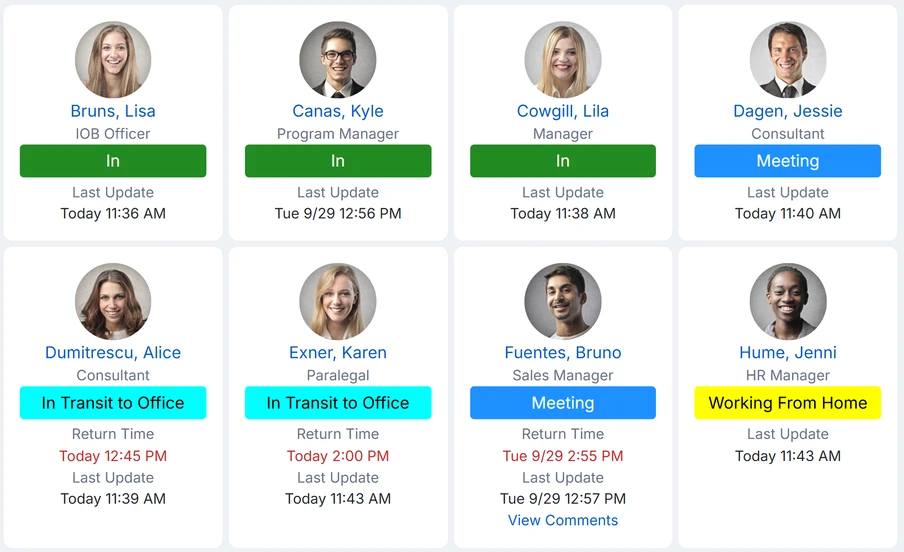
How it works
There are three moving parts, and your team only has to think about the first one.
-
1. People set their status
A few clicks from a desk or a phone: pick a status, add a return time if it matters. Events on a person's own My Calendar can change their status for them, once an administrator switches that on.
-
2. Everyone sees the status board
Everyone is looking at the same board—reception, the field, the branch office, anyone with a browser. It reloads itself on the interval each person picks, every five minutes to begin with. No phone call, no walking down the hall.
-
3. The status board watches back
A return time that passes turns red on the status board on its own, and once alerts are set up it can email and/or text the managers named on that person's profile. And when you need to account for everyone at once, the Emergency Status Report lists each person's last recorded status with their emergency contacts. What alerts need.
From the wall to the web
The original in/out board is a physical thing: a grid by the front door with every employee's name down one side and a magnet or a sliding tab to mark them in or out. Some offices call it a staff whereabouts board; others never got past a paper sign-in sheet on a clipboard. Whatever it is called, it has been in use for decades, because it answers a question that comes up dozens of times a day—is that person here?
They also have an obvious flaw. The board only works if you are standing in front of it, and it only stays accurate if everyone remembers to move their magnet on the way past. The moment your team has a second location, a field crew, or anyone working from home, the board by the door is telling half the story to half the people.
InOutBoard is that same board, online. Everyone can see it and everyone can update it, from wherever they happen to be. And because it is software rather than a sheet of metal, it can do things the original never could: raise an alert when someone is overdue, hold a shared calendar, book the conference room, keep a searchable history of every status change, and pull an emergency contact roster in one click.
What it is not is a surveillance tool. There is no GPS and no location tracking. People choose their own status from a list your administrator sets up, and events on their own calendar can change it for them when that is switched on. The status board only ever knows what your team tells it.
What comes with it
The status board is the heart of it. These come in the same box.
Who uses it
Any organization where people come and go—which is most of them. Offices with a front desk and a phone to answer. Field crews who leave at seven and come back at four. Clinics, schools, city departments, nonprofits with more volunteers than staff, and manufacturers who need a headcount when the alarm sounds. And hybrid teams, where the answer changes from one day to the next.
Common questions
Is this a time clock or a payroll system?
InOutBoard is a staff-status board with time-reporting features. People set their own status, the status board keeps a history of every change, and reports turn that history into hours: My Time Card and Time Card for daily totals, Time History for every status change, Time By Status Code and Time By Status Type for hours by code. Managers and administrators use those reports to review attendance and check time records ahead of payroll, and every report exports to CSV. What InOutBoard does not do is calculate wages or process payroll—there are no pay rates, no overtime rules, and no pay runs in the product. It keeps the time records; your payroll system does the math.
Does it track people's location?
No GPS, no location tracking. People choose their own status and location from a list your administrator defines—"Job Site A", "Working from home", "In a meeting". The status board knows exactly what your team tells it and nothing more.
Won't people forget to update it?
Some will, at first. Three things help: it takes a few clicks from a phone, events on a person's own My Calendar can change their status automatically, and a return time that has passed turns red on the status board on its own—with an email or text to their manager as well, once alerts are set up. In practice teams settle into it within a week or two—the status board is only useful if it's current, and people notice fast when it isn't.
Do we have to install anything?
No. InOutBoard runs in a web browser on any computer, tablet, or phone—no app store download, no updates for IT to push. Installing it as a web app with its own icon is optional. More about mobile.
How long does it take to set up?
An afternoon is typical. Add your people, adjust the status codes to match how your organization actually talks, and you have a working board. Users can be added in bulk if you have a long list. Setup help.
What does it cost?
Plans start at $15 a month for 10 users, with every feature included at every size, and annual billing gives you a month free. Every account starts with a free 30-day trial, no credit card, and continuing after that needs a paid plan. Full pricing.
See your team
on one board
Try every feature free for 30 days. No credit card required.