
Team status dashboard: Your whole team, at a glance
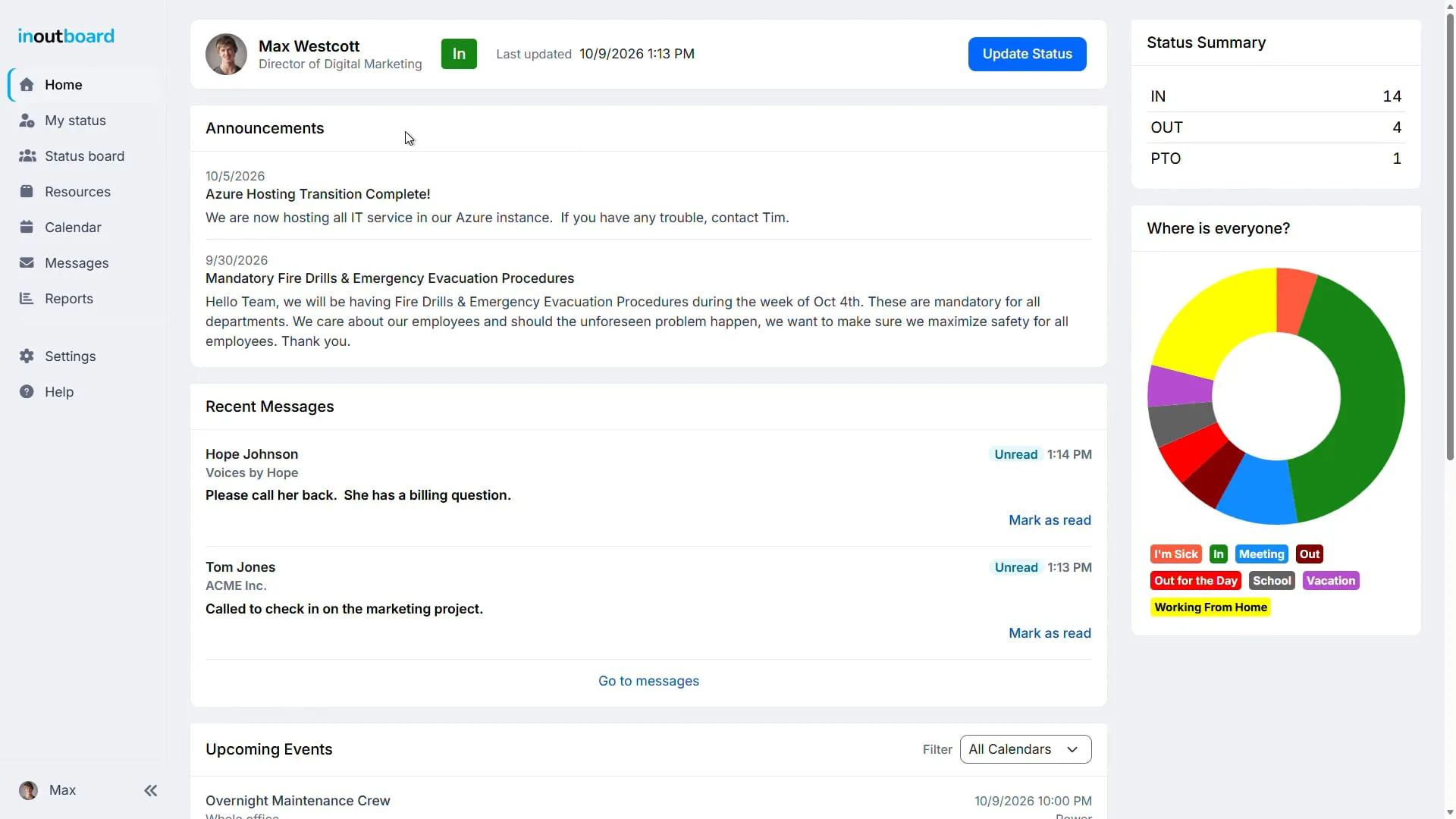
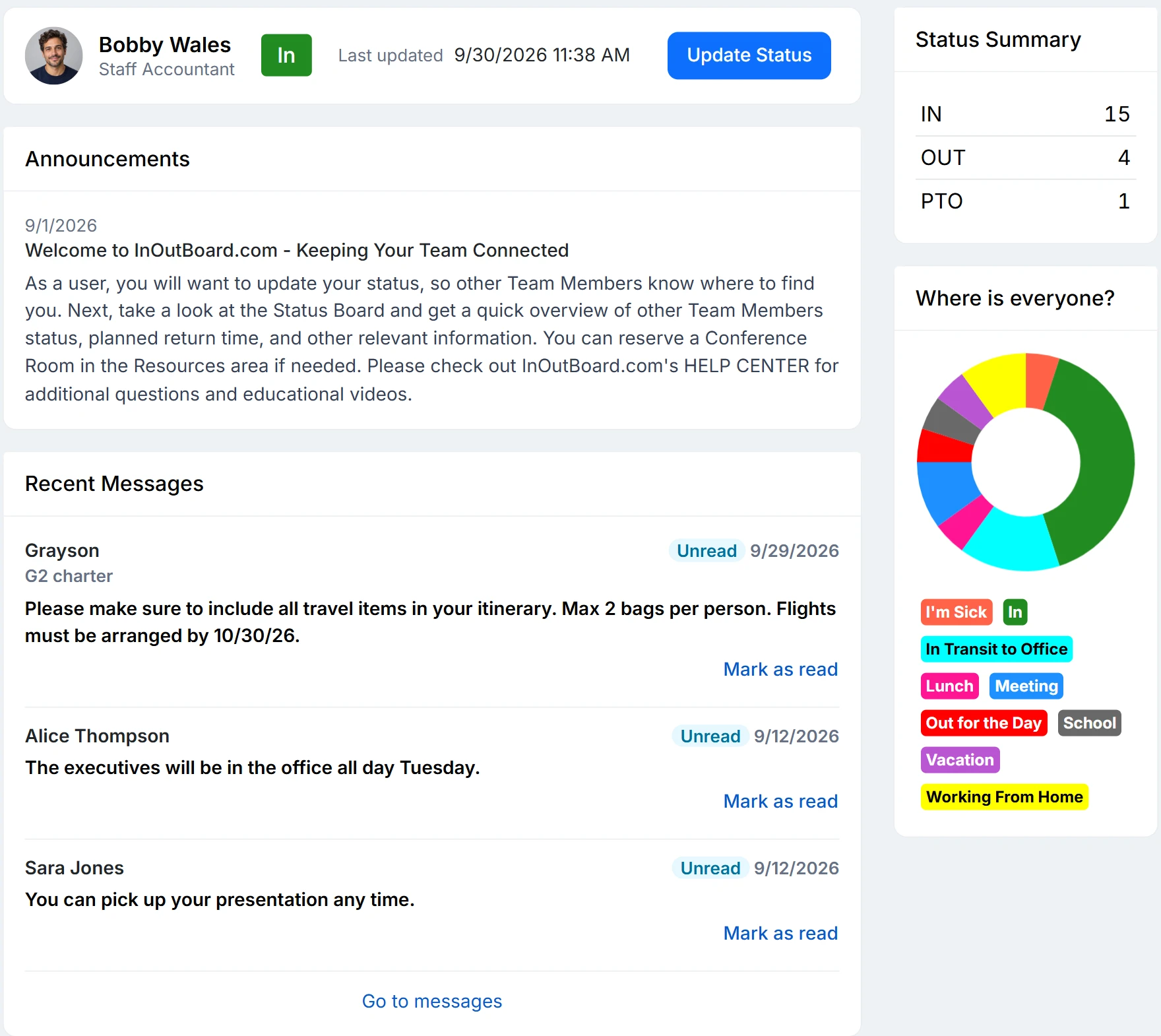
The Home Dashboard is where you land once you have set your status after signing in: your own status card with Update Status, company announcements, recent messages, your next seven days of events, a status summary, and the Where is everyone? chart.
Less than 1 minute
Read the video transcript
Start your day with seeing everything you need to know about your team. This is the InOutBoard dashboard.
Your status sits at the top, where you are, when you’ll be back, and when it was last updated. Plans changed? Update status is one click away, and your team sees it instantly.
The where is everyone chart totals your team by status, so you know who’s in the building without walking the halls. Click any segment to jump to the status board and see who’s there.
Important news doesn’t get lost in an inbox. Announcements show up as soon as people sign in, and administrators can send them to everyone or to a specific location or team.
Recent messages and your next seven days of events from your own calendar and your company’s shared calendars sit right alongside them.
Everything you need to start your day is on one screen. Thanks for watching. Sign up today and start your 30-day free trial with InOutBoard.
Powerful features for productive days
Everything you need to start the day is on one screen.
-
Your status, front and center
Your current status, return time, and last update sit at the top of the page, with Update Status one click away. Your photo takes you straight to your profile.
-
Stay organized and informed
Announcements, recent messages, and your upcoming calendar events all land on one screen. No hunting through separate apps.
-
Your team in one chart
The Where is everyone? chart totals everyone on your team who has a status, by status code. Click a segment and it opens the status board filtered to those people.
Your executive overview
Stay in the loop before your first cup of coffee.
- See company announcements as soon as you have set your status.
- Recent messages and your upcoming calendar events, front and center.
- The Where is everyone? chart totals everyone with a status by status code.
- Click any chart segment to open the status board filtered to those people.
- Works on any device—desktop, tablet, or phone.
What is on the dashboard?
Your own status with an Update Status button, company announcements, your recent messages, your events for the next seven days, a count of who is in each status type, and the Where is everyone? chart. Signing in opens your own status first; select Save or Cancel there and the dashboard is next, and Home in the side menu brings you back to it at any time.
Which calendars show in upcoming events?
Your My Calendar and every shared company calendar you have been given access to, for the next seven days. Select an event's title to open it.
What happens when I click the chart?
Each segment of the Where is everyone? chart is one status code. Click a segment, or a badge under the chart, to open the status board filtered to the people currently in that status. Dashboard help covers the rest of the screen.
Who posts the announcements?
Administrators. An announcement can go to everyone, or be targeted to one location, one team, or people in both, and it appears on each person's dashboard between the start and end dates it is given.
Explore more features
Everything below is included with every InOutBoard account — no add-ons, no upgrade tiers. See pricing.


Join the thousands of teams who rely on InOutBoard
I'm happy to say that I have had this job for 3 years and have never had to place a call into support…it's that easy to use.
 Paige M.
Dawson Power
Paige M.
Dawson Power
Know who's in and out.
Instantly
Try every feature free for 30 days. No credit card required.