
Lone worker check-in alerts: An extra layer of safety for your team
Alerts help protect employees working remotely, alone, or in the field. When someone misses a check-in, designated managers are notified by email or text after your configured alert interval.
1:06 minutes
Read the video transcript
Whenever an employee misses their return time, InOutBoard’s alert system will notify a manager via email or text message. Getting started only takes a minute.
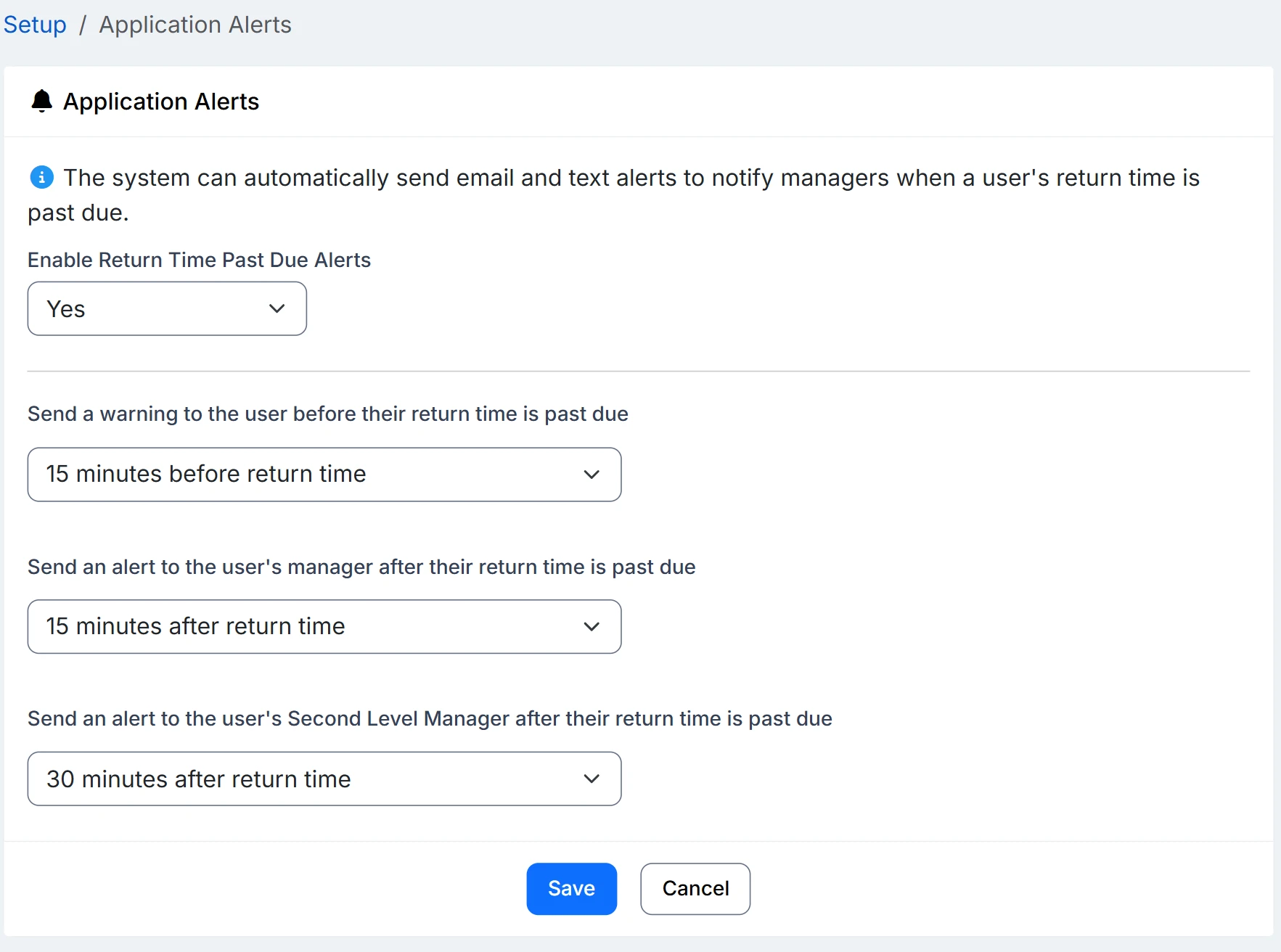
Administrators can turn on alerts and application alerts and choose how long to wait before messages are sent, ranging from 15 minutes up to three hours.
On your profile, open Alert Settings and choose how you want to hear from InOutBoard, either via email, text, or both.
If you already have a confirmation code, type it in the box on the right.
After setting up alerts, click on Edit Profile and add your manager and second-level manager so the right people are notified if you’re running late.
There’s no GPS and no tracking, just a simple check-in that runs in the background.
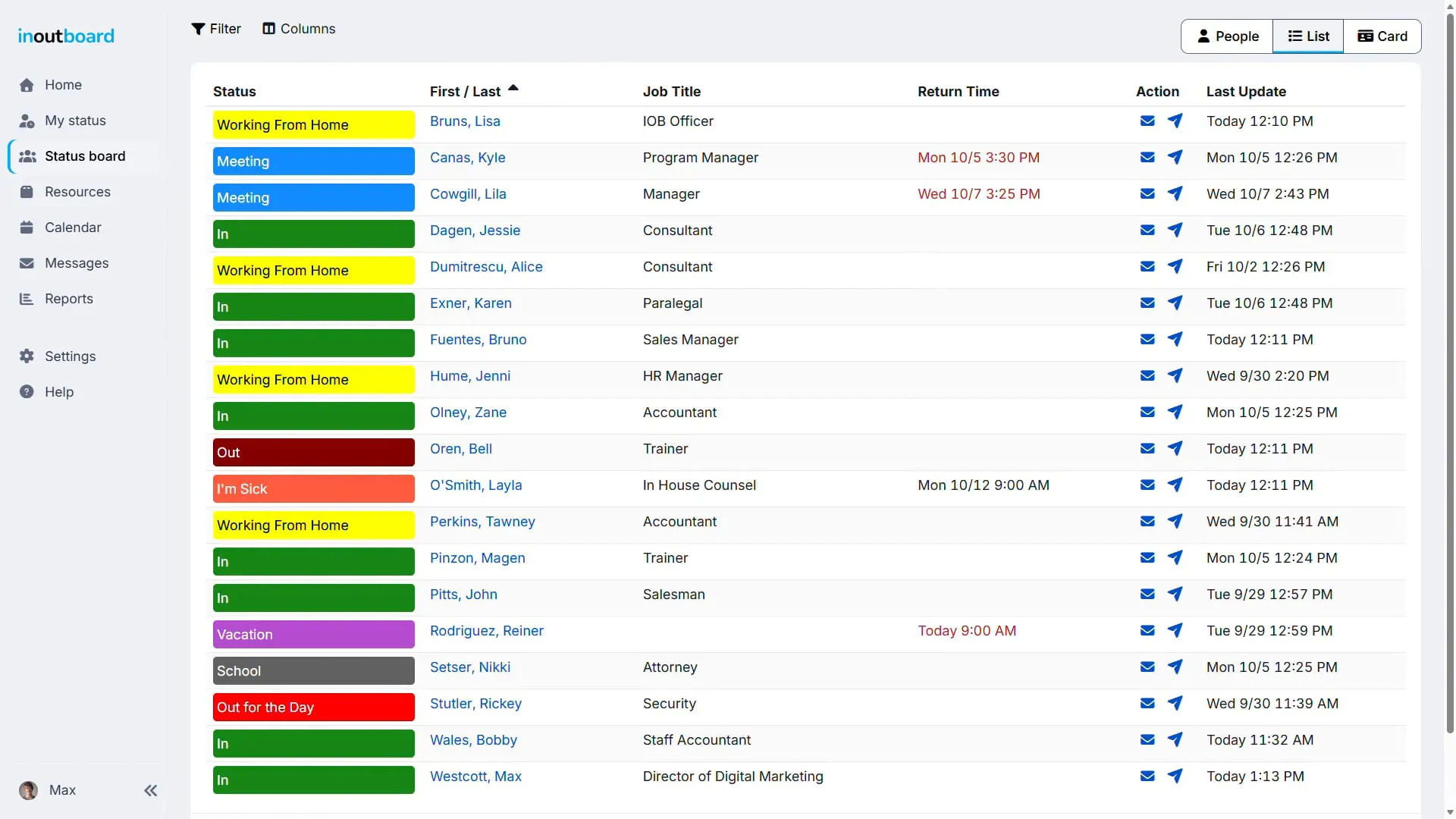
Even without alerts on, overdue return times show up in red on the status board.
Thanks for watching. Sign up today and start your 30-day free trial with InOutBoard.
Because “probably fine” isn't good enough
When someone doesn't come back on time, the right people find out—on the timing you configure.
-
Stay informed, stay safe
The person is warned before their return time, told again when it passes, and then their manager and second-level manager are notified on the intervals you set.
-
Visible on the status board
A return time that has passed turns red on the status board, with no alert setup at all—so it is obvious at a glance who is overdue.
-
Flexible notifications
Each person chooses email, text, or both for themselves. Administrators switch the feature on and set the timing for everyone. How to set it up.
Peace of mind, built in
- Before the return time The user gets an alert
- At the return time The user gets an alert
- Interval after the return time Their Manager gets an alert
- Second interval after Their Second Level Manager gets an alert
Choosing a Manager and Second Level Manager is optional; users add or edit their managers on their User Profile. An Administrator sets each interval, from 15 minutes to 3 hours. All alerts for past due times are sent using the expected return time. The delivery time of alert notices is not guaranteed: delivery may take longer if users are in a low-signal area, or not connected to the internet at the time of delivery.
- Administrators pick which status codes require a return time.
- Overdue return times turn red on the status board.
- Managers get an email or text after the interval you set—usually within a few minutes of it.
- Ideal for lone workers, field techs, and home visits.
- Admins enable overdue alerts and set the interval; each profile names the managers who get them.
- Works anywhere your people do—office, field, or home.
Is this a lone worker safety system?
Not in the sense of a man-down device or a panic button. InOutBoard has no GPS, no motion sensing, and no hardware. What it does is simpler: when someone sets a return time and has not updated their status by then, the status board shows them in red and the managers named on their profile are emailed or texted after the interval you set. It is a check-in, not a tracker.
Who gets alerted, and when?
The person is warned before their return time and told again when it passes. Then the Manager and Second Level Manager on that person's profile are notified after the interval an Administrator sets under Application Alerts, anywhere from 15 minutes to 3 hours after the return time.
Do alerts come by email or text?
Each person chooses for themselves under their own Alert Settings: email, text, or both. Text alerts need the person's mobile number verified first. Texts and emails from InOutBoard are one-way; replying to one does nothing.
Does every status need a return time?
No. Only a status code with Return Time Required set to Yes can produce an alert, and an Administrator decides which codes those are. A code with an Offset By or Fixed Return Time fills the return time in automatically when it is chosen.
Does it track where people are?
No. There is no GPS and no location tracking. An alert is based entirely on the return time the person set and whether they updated their status before it passed.
Explore more features
Everything below is included with every InOutBoard account — no add-ons, no upgrade tiers. See pricing.


Join the thousands of teams who rely on InOutBoard
InOutBoard works great and very easy to use…from a safety standpoint, it's great to know quickly who's in the building and who isn't.
 Brenda S.
SIRWA
Brenda S.
SIRWA
Know who's in and out.
Instantly
Try every feature free for 30 days. No credit card required.