
The status board for Law Enforcement, Courts & Criminal Justice
InOutBoard is an online in/out status board where officers, prosecutors, clerks, and support staff set their own status and return time, so a shift commander or office administrator can see who is on duty, in court, or on assignment. Accountability, at a glance. See who's on duty, in court, or out on assignment—and each person's last recorded status when it matters most.

When accountability isn't optional
-
Duty status at a glance
Officers, investigators, and support staff update one board—on duty, in court, on assignment, or off.
-
Overdue returns get noticed
Investigators, civilian staff, and anyone working away from the office carry a return time. Miss it, and their supervisor hears about it.
-
Records you can produce
Status and time history you can report on—for audits, oversight, and internal review. Export to CSV on your own retention schedule.
-
Connect courts, offices, and the field
Prosecutors and public defenders in court, clerks at the office, staff at satellite sites—everyone sees the same board.
A duty record you can actually produce
The status board keeps the history. The reports hand it over.
How a request for records gets answered
- Organize divisions and satellite sites as locations and departments, so a shift commander can filter the status board to the relevant team.
- An Administrator adds status codes that match assignment reality: Field assignment, Court, Training, Detail, Off duty.
- Staff set status as the day goes. Every change is timestamped automatically—nobody maintains a separate log. An Administrator can correct an entry afterwards, for example when someone forgot to update.
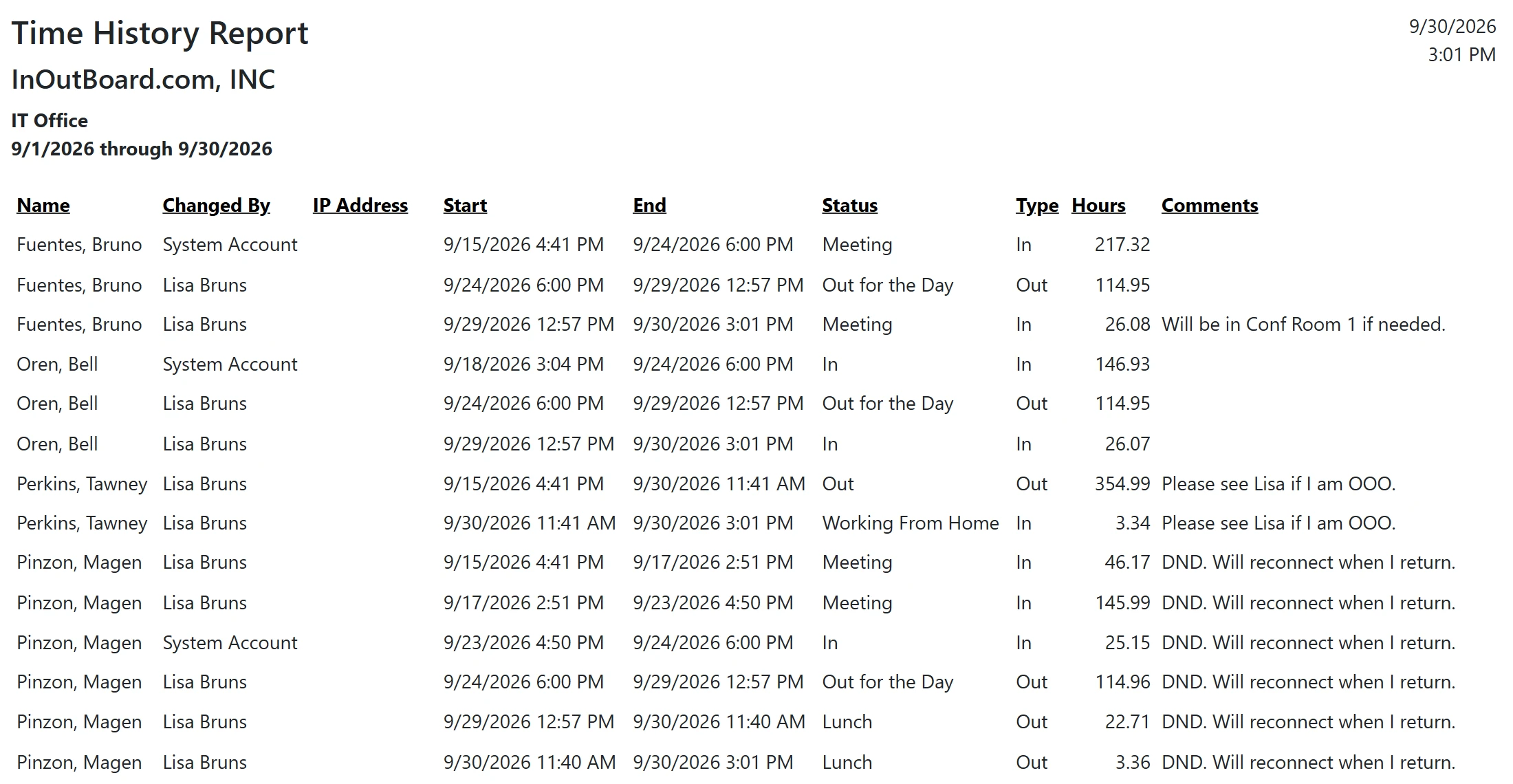
- Managers and Administrators can also see the IP address recorded against most status changes, providing additional context when reviewing a person's status history.
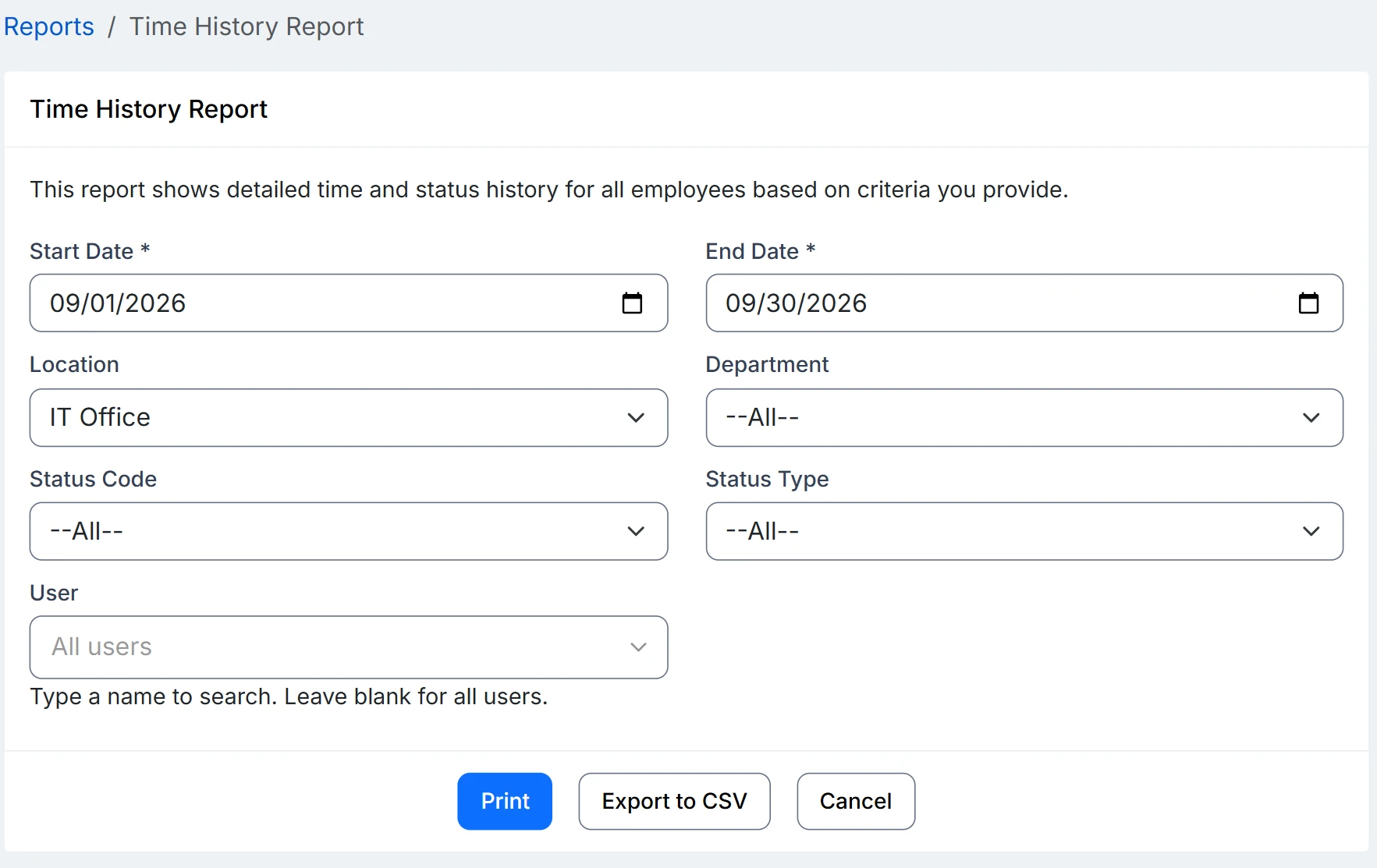
- When records are requested, run the Time History Report for the date range, division, and people in question, then export to CSV.
Overdue alerts need a few things in place: alerts enabled, a status code that requires a return time, a manager assigned on each user’s profile, and recipients opted in to email, or to text with a verified mobile number.
Is InOutBoard CJIS compliant?
We make no CJIS claim. InOutBoard holds staff names, statuses, return times, and comments, not case data or criminal justice information, and it should not be used to store any. Data is hosted in Microsoft Azure data centers in the United States and encrypted in transit and at rest; sign-in is by username and password, with single sign-on and multi-factor authentication on the roadmap rather than available today. The security page has the full list.
Who can see what?
Every user sees every colleague's status, return time, and comment on the status board, so keep operational detail out of comments. Administrators, and Managers for people at their own location, can also see status history, including the IP address recorded with most status changes, and run the reports; a Manager's reports cover their own location.
Can we account for everyone in an incident?
You can list each person's last recorded status and emergency contact on the Emergency Status Report, filtered by division or site. It is what people entered, not a verified headcount; emergency roll call explains what it can and cannot tell you.
Where to go next
The pieces this page describes, in detail.
One answer to “where is everyone?”
Agencies and courts run on knowing where people are. InOutBoard gives command staff and office administrators one answer—without missed messages and unreliable phone trees.


Join the thousands of teams who rely on InOutBoard
This has been such a huge upgrade from our previous process. The Status Board is up all the time, giving us real-time status updates from our employees. Easy to use too.
 Elizabeth C.
City of Santa Cruz
Elizabeth C.
City of Santa Cruz
Know who's in and out.
Instantly
Try every feature free for 30 days. No credit card required.